They're okay.
One tap says so.
You decide how often you check in. Every day before 11am, for example. One tap is enough. If the tap does not come, the people you listed get an email.
Free during the beta. For iPhone, iPad and Android.
Calling feels like checking up on them. Not calling feels worse.
You wonder whether your mother got home safely. Whether your friend who lives alone got out of bed today. Calling every morning would be strange, so you do not call and think about it anyway. Those blue ticks on WhatsApp only tell you somebody was holding their phone.
I do not want to be a burden. And I do not want anyone worrying about me either.
How Ondira works
Set it up once. After that the app only speaks up when you do not.
Pick a rhythm
Every day before 11am. Every Monday. Every other day. You choose the interval and the time.
Tap once
Open the app, tap the button, done. It takes two seconds.
A reminder if you forget
When the window closes, Ondira comes to you first: a push notification and an email.
Only then your contacts
If you do not respond to that either, your trusted contacts get an email. Not before.
Why not just call or send a message?
Calling and texting always take two people. Someone has to ask, someone has to answer, and whoever asks more often than the other would like starts to look like a nag. Location apps solve it the other way round: they show where someone is at all times. Ondira does neither. It only remembers whether you were there today.
This is what your contacts see
No alarm, no red banner, no app they have to install. Just this email, and only when a check-in really did not arrive.
Anna last checked in on Monday 16 September at 09:42. Nothing came in for yesterday.
This may well be nothing. A flat battery, a hectic day. You are listed as a trusted contact, which is why you are the first to hear.
For families, people living alone, and travellers
Three situations Ondira was built for.
Parents living on their own
You know by morning that everything is fine, without calling. Nobody has to explain how the day went or why it was bad.
People who live alone
If you fall and nobody notices, it can take days before someone looks in. Ondira cuts that down to a few hours.
Travelling and away from home
Set a rhythm before you leave. Then nobody at home has to guess whether the silence is just bad reception.
What we store and what we don't
- No movement profile
- Ondira asks for your location at check-in only, and only if you switched that on. Nothing runs in the background.
- No ads, no data selling
- There are no advertising identifiers in the app and we pass nothing on to third parties. The beta is free, after that Ondira becomes a subscription. That is how we make our money, not from your data.
- 14 days of check-in history
- Nothing is kept longer than that. You can delete your account inside the app, and then it is all gone.
What the app looks like
The check-in, the window running out, and the contacts who hear about it after that.
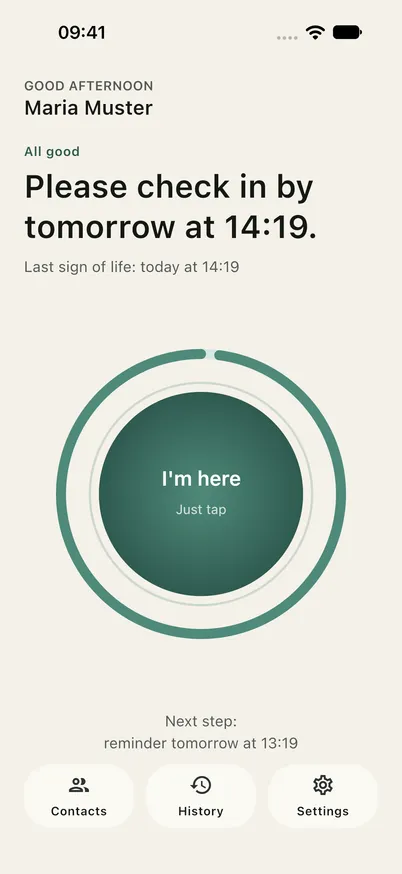
The daily tap
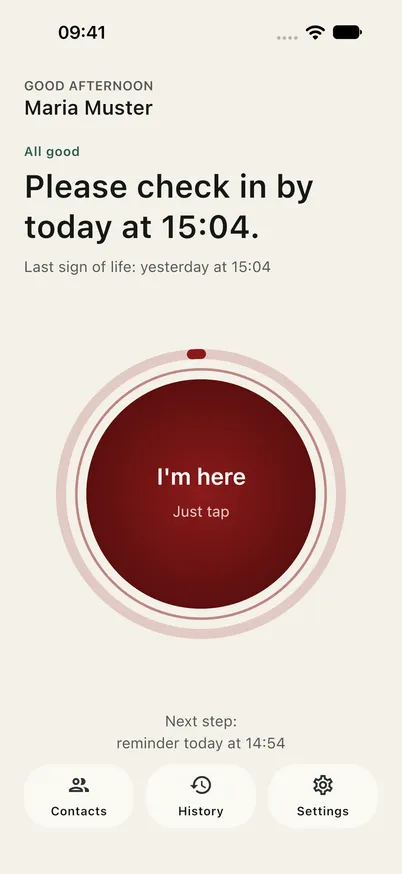
When the window runs out
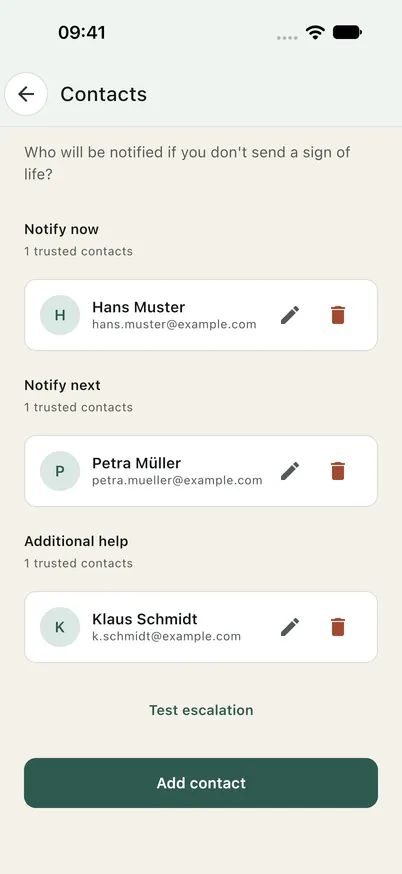
Who hears, and when
A few months ago I read about a woman who had been dead in her flat for four weeks before anyone found her. She had neighbours, she had family. Nobody had a reason to look.
What stayed with me was not the death. It was the number. Four weeks. And the question of how long it would take with me.
So I went looking for something that answers that without being an emergency system. What I found was either built for the worst case or wanted somebody watching my location all day. There was nothing in between. So I built the in-between.
Frequently asked questions
Is Ondira an emergency service?
No. Ondira is not an emergency, rescue, medical or monitoring service, and it does not replace a personal alarm system. If somebody needs help right now, call the emergency number.
What happens if I forget a check-in?
At first nothing except a reminder to you, as a push notification and an email. Only if you do not respond to that either do your trusted contacts get a calmly worded email. You set how long the window is.
Can I leave messages for my loved ones?
Yes. You can store personal messages that are only sent once every escalation step has passed without a response. The feature is optional and has nothing to do with the daily routine.
Is my location tracked?
Not in the background. If you switch it on, you can send your current location along with a check-in. Between check-ins Ondira does not ask for your location, and no movement profile is built.
Who gets notified, and when?
Only the contacts you entered in the app, and only when no check-in arrives inside your window. Ondira does not write to them for any other reason.
Do my contacts need the app too?
No. All they need is an email address. Anyone who wants to can install the app as well and see the overview, but it is not necessary.
Can trusted contacts be changed or removed?
Yes, at any time in the app. Contacts can also remove themselves through a link in every notification.
What does Ondira cost?
Nothing during the beta, and no credit card is asked for. After that Ondira becomes a subscription. The price is not settled yet, but it will be communicated well in advance, and nobody is rolled into a paid plan automatically.
Which platforms does Ondira run on?
iPhone, iPad and Android, tablets included. Contacts only need an email inbox, whatever device they use.
What data is stored?
Account details (name and email), the last 14 days of check-in history, your rule settings and the contacts you add. Plus your location at check-in, if you enabled that. No health data, no advertising identifiers.
Does Ondira work without internet?
A check-in needs a connection for a moment. If you will be offline for longer, on a hike for instance, set a wider rhythm beforehand.
Join the beta
The beta is free and you can leave whenever you like. We will email you as soon as a place opens up.